Docker Engine and a custom web server image
MILOUD NECILI
Fraîche Flow · IT Systems Integration
Project objective
Understand container deployment and reproducibly build a custom web server image with tailored HTML.
My implementation
- Used Docker Engine and Docker Compose on ff-app-01.
- Created a Dockerfile with an Apache base image and a custom HTML file.
- Built the
webserverimage and started a container with port mapping8000:80. - Rebuilt after changing the HTML file and checked access from the management client.
Technical context
| Project folder | ~/docker_apache |
|---|---|
| Image | webserver |
| Host/container port | 8000 → 80/TCP |
| Engine / Compose during the project | 29.9.2 / v5.6.1 |
Result
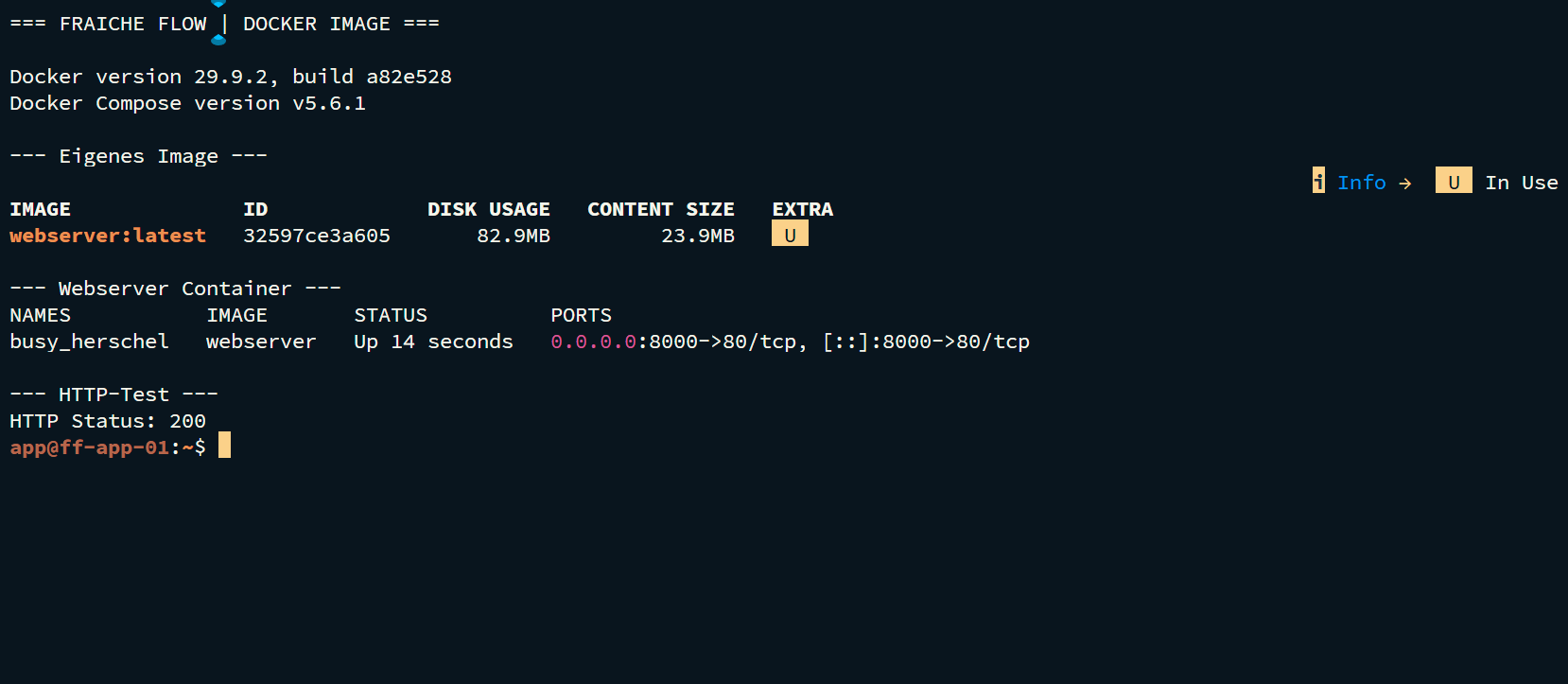
The container using the webserver image appeared as Up in docker ps. Web access on port 8000 was confirmed earlier in the project and later added to monitoring.
Verification and operational evidence
docker --version; docker compose version
docker images
docker ps --format "table {{.Names}}\t{{.Status}}\t{{.Ports}}"
curl -I http://192.168.10.13:8000
Practical troubleshooting
A change to an HTML file copied into the image only became visible after rebuilding and creating a new container. This demonstrated the distinction between the host file and image contents.
Security and technical context
Document image versions and build context. A running container is not a complete application test. Do not keep persistent data solely in the writable container layer.
Transferable skills
Dockerfiles, image builds, port mapping, rebuilding and HTTP functional testing.
Project status
Completed according to confirmation from the project lead.